A free app for Mac
Switchboard
The Mac settings you flip all day, one click away in the menu bar.
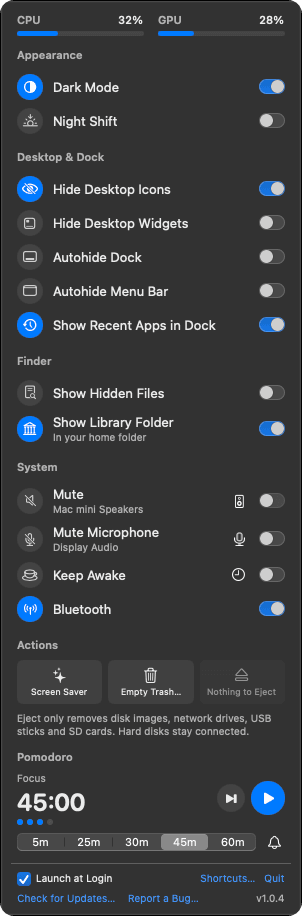
Switchboard is a menu bar panel of quick toggles for Dark Mode, Night Shift, the Dock, hidden files, mute, Bluetooth, Keep Awake and more, each showing what your Mac is really set to right now. Plus a Pomodoro timer and CPU and GPU meters.
- macOS 15 or later
- Apple silicon and Intel
- Free and open source
- Signed and notarized by Apple
Version 1.0.5
Why I built it
It started with something I needed.
I leaned on a menu bar utility for the small switches I flip all day: dark mode, hiding the desktop before a call, keeping the Mac awake through a long export. It kept hanging.
So I built my own. Every switch reads what the Mac is actually set to, so what you see is always true, and it sits quietly until you click it.
What it does
What Switchboard does
- Switches that tell the truth
- Dark Mode, Night Shift, hide desktop icons and widgets, autohide the Dock and menu bar, show hidden files. Each switch shows what macOS is set to right now.
- Sound and microphone
- Mute your output or your microphone, and switch between speakers and mics right from the panel.
- Keep Awake, your way
- Keep the Mac awake until you turn it off, for 1 to 8 hours, or while a particular app is open.
- Eject and Empty Trash
- Eject leaves hard disks connected and names the app holding a drive. Empty Trash always asks first.
- Pomodoro and meters
- A focus timer with breaks that are hard to miss, and CPU and GPU load at the top of the panel. Bluetooth is a switch too.
- A shortcut for anything
- Give any switch or action a global keyboard shortcut. Restore original settings puts back everything Switchboard changed.
Private by design
It stays on your Mac.
- Switchboard does its work on your Mac. No accounts, no analytics, no tracking.
- Switchboard never listens to your microphone. Mute Microphone flips the microphone’s own switch, and macOS would not even let the app ask to record.
- It doesn’t poll your Mac in the background, so it stays very light.
- The only time it goes online is a once-a-day check for updates, and every update is signed so it can’t be forged.
Permissions, asked only when a feature first needs them
- Control of System Events and Finder, the first time you use a switch that needs it.
- Bluetooth, only when you allow it on the Bluetooth row.
- Notifications, only if you turn off the Pomodoro pop-up.
How it's built
For the technical reader.
Written in Swift. It reads and changes settings through Apple’s own system frameworks and, where macOS offers no other way, short AppleScripts sent to System Events and Finder (never a shell).
Every release is signed with my Apple Developer ID and notarized by Apple, and runs with the hardened runtime, so other software can’t slip code into it. Updates come through Sparkle, and each update is signed with the app’s own EdDSA key and checked against it before anything is unpacked.
- SwiftUI
- AppKit
- Core Audio
- Core Bluetooth
- IOKit
The full code is on GitHub, MIT licensed.
Ready to try Switchboard?